Coloring Fun for Kids
Reviews
Coloring Fun 4 Kids provides a clean, intuitive interface that young children can navigate independently. The selection of cute images is varied enough to hold interest, and the brush and stroke tools work well on both touchscreens and mouse. The game encourages color recognition and fine motor skills without any pressure. Parents will appreciate the ad-free, family-safe environment. It is a reliable choice for quiet playtime or travel.
Description
Game Introduction
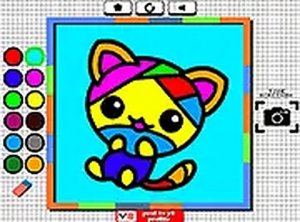
Coloring Fun for Kids is a cheerful online coloring activity designed for young children. The game offers a selection of adorable images, including friendly animals and charming objects, that kids can bring to life with their favorite colors. It encourages creativity and fine motor skills in a safe, mess-free digital environment. This free online game runs directly in the browser on both desktop and mobile devices, making it accessible anytime for fun screen-time. With no downloads required and a full-screen mode available, it provides a family-friendly space for little ones to explore their artistic side.
How to Play
To start playing, choose one image from the selection on the screen. Then pick between the brush or stroke method for painting. The brush tool allows freehand coloring, while the stroke tool fills larger areas quickly. Next, select a color from the palette and apply it to the areas you want to color. Carefully fill each section of the chosen image, using different colors to make it vibrant. Complete all the colors for the image to finish your masterpiece. The game is easy to navigate with intuitive controls, perfect for young players. You can play on desktop or mobile, and switch to full-screen mode for a more immersive experience.
Game Features
Safe, family-friendly coloring activity for kids. Easy-to-use brush and stroke tools. Vibrant color palette for creative expression. Works on desktop and mobile devices. Full-screen mode for immersive play. No downloads or registration required, ensuring instant access. The game is designed to be intuitive for young children, with large buttons and simple interactions. It provides a mess-free alternative to traditional coloring, perfect for travel or quiet time.
Tips for Success
Encourage children to experiment with different color combinations to make each image unique. Using the stroke tool first for large areas can help complete the picture faster. For finer details, switch to the brush tool for more control. Taking breaks between coloring sessions can keep the activity fresh and enjoyable. Parents can join in by suggesting themes or discussing the colors used, turning playtime into a learning opportunity about colors and shapes.
Compatibility
This H5 game runs smoothly on: • Desktop computers (Windows / Mac) • Mobile phones (iPhone / Android) • Tablets (iPad / Android) 🌐 Best experienced with Chrome, Safari, or Edge
Faq
Is this game free to play?
Do I need to download any software to play?
Can my child play this game on a tablet or phone?
Is the game safe for my child to use without supervision?
What age group is this game suitable for?
Can I save my child's artwork?
Related Picks
Bike Racing Math Rounding Online Arcade Game
Clever mix of math and racing. Simple to play and good for quick practice sessions.
Escape from the Children Room Boys Edition - Puzzle Game
A delightful puzzle game with clear objectives and gentle difficulty. Perfect for family fun.

Rhyme Workout Word Puzzle
Clean design and smooth gameplay. Great for short breaks and improving vocabulary.

Lightybulb Puzzle Game Online
Clean design and smooth gameplay. Great for short breaks.

Constellations Knot Puzzle Online
Challenging and rewarding puzzles. Great for improving spatial reasoning. Clean interface.

Spell School Spelling Word Game
Simple drag-and-drop spelling practice. Colorful pictures and no time limits make it perfect for young learners.
Grizzy & the Lemmings Coloring Game
Bright and easy to use. Kids enjoy switching between drawing and coloring modes. Safe and fun.
Sprunki Memory Match Kids Game
Clean design and smooth gameplay. Great for short breaks and memory practice.