Typing Speed Racer
Reviews
Typing Speed Racer offers an engaging way to improve typing skills through a racing theme. The adjustable word length allows beginners to start easy and progress to harder words. It works seamlessly in a browser on both mobile and desktop, with no downloads needed. The full screen mode helps minimize distractions. This game is ideal for anyone wanting to practice typing in a fun, low-pressure environment.
Description
Game Introduction
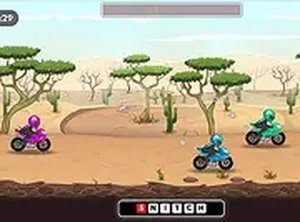
Typing Speed Racer is a typing game that combines keyboard practice with a racing theme. The core objective is to type words displayed on the screen to accelerate a bike and compete in races. Each correct keystroke translates into speed, making typing accuracy and speed essential for success. What makes this game unique is its adjustable difficulty: players can choose word length, from short words for beginners to longer words for experienced typists. This design helps improve typing speed and accuracy in an engaging, interactive way. The game runs entirely in a browser, supports both mobile devices and desktop computers, and can be played in full screen for a more focused experience. No downloads or installations are required, so players can start immediately. It is suitable for all ages and skill levels, offering a fresh race each time for continuous practice.
How to Play
To play Typing Speed Racer, first select the word length you want to type. The game shows words on the screen. Players type each letter correctly to move their bike forward. Completing a word gives a speed boost, so the faster and more accurately you type, the faster your bike goes. You can choose easier words to start and progress to harder ones as you improve. The game works on mobile and desktop browsers and can be played in full screen. No downloads are needed—just open the game and start typing to race.
Game Features
Typing Speed Racer offers adjustable word length from short to 8-letter words, allowing players to tailor difficulty. It works on mobile devices and desktop browsers, with full screen mode for an immersive experience. No downloads or installations are required, and it is free to play online. Each race is different, providing fresh practice. The game is suitable for all ages and skill levels, making it a versatile tool for improving typing skills.
Tips for Success
Practice regularly to improve your typing speed and accuracy. Start with shorter words to build confidence, then gradually increase word length. Focus on typing each letter correctly rather than rushing, as accuracy leads to consistent speed boosts. Use full screen mode to minimize distractions. Consistent practice will help you type faster and race better over time.