Royal Bridal Fashion Designer
Reviews
Royal Bridal Fashion Designer offers a relaxing styling experience with a good selection of gowns and accessories. The ability to style two different characters adds variety, and the drag-and-drop controls are smooth. While the gameplay is simple, the range of hairstyles and makeup options allows for genuine creativity. It is a solid choice for younger players or anyone looking for a low-pressure fashion game.
Description
Styling Mechanics & Customization
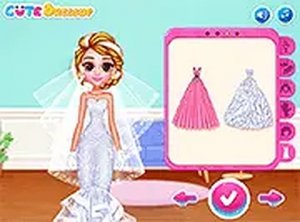
Players begin by selecting one of two characters to style. The core gameplay revolves around browsing a collection of formal gowns, each with distinct colors and silhouettes. After choosing a dress, users can add complementary accessories such as veils, tiaras, and jewelry. The interface is drag-and-drop, making it easy to swap items and see instant previews. This system encourages experimentation with different combinations to achieve a cohesive look.
Character Selection & Narrative Context
The game features two characters who are central to the styling process. Each character has a unique base appearance, which influences how different outfits and accessories look. The narrative context involves preparing these characters for a significant life event, adding a layer of purpose to the styling decisions. Players can style each character separately, allowing for two distinct fashion outcomes within a single session.
Accessory & Beauty Options
Beyond dresses, the game offers a range of beauty and accessory choices. Hairstyles vary from updos to flowing locks, and makeup options include different shades for lips and eyes. Footwear selections include various heel styles and colors. The depth of these options allows for detailed personalization, from a classic traditional look to a more modern aesthetic. Each accessory category contains multiple items, providing variety for repeated play.
Sharing & Presentation Features
Once a look is finalized, players can capture their creation using an in-game screenshot tool. This feature enables users to save their designs or share them with friends through social platforms or messaging apps. The presentation of the final styled character is clean and visually appealing, making shared images suitable for inspiration or friendly competition. This social aspect extends the game's replay value beyond individual sessions.
Accessibility & Platform Support
The game is built to run directly in a web browser without requiring any software installation or account creation. It supports both mouse and touch input, making it playable on desktop computers, tablets, and smartphones. The interface is designed with large buttons and clear icons, which helps younger players navigate independently. Performance is optimized for smooth loading and responsive interactions across different devices.








Comments
0 comments