Precision Parking 3D Simulator
Reviews
Precision Parking 3D Simulator offers a relaxing yet challenging experience. The realistic 3D graphics and smooth controls make parking feel satisfying. Each level increases in difficulty, encouraging careful planning. It is free, browser-based, and family-friendly. A great way to improve spatial awareness and hand-eye coordination.
Description
Game Introduction
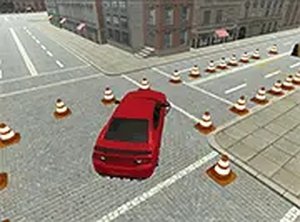
Precision Parking 3D Simulator is a browser-based driving simulation that challenges players to park a car in a realistic three-dimensional environment. The core objective is to navigate through courses marked by traffic cones and barriers, then park in the designated spot. Each level presents a new layout, gradually increasing in difficulty. The game is designed for desktop computers, offering smooth controls and clear graphics. It is completely free to play and runs directly in your browser, requiring no downloads. This game provides a calm yet engaging test of control and focus, suitable for players of all skill levels.
How to Play
Players typically use keyboard arrow keys or mouse to steer the car. The goal is to drive through the obstacle course and park in the marked spot without hitting any cones or barriers. Collisions may restart the level, encouraging careful planning. Taking time to plan the route is recommended, as rushing often leads to mistakes. The game is optimized for desktop use, so playing on a PC or laptop offers the best experience. Full screen mode can be activated for a more immersive view.
Game Features
The game includes realistic 3D graphics that create an engaging environment. It is free to play with no hidden costs. The obstacle courses are designed to test precision and patience. Full screen mode is available for a larger display. The content is family-friendly and suitable for all ages. The game helps improve hand-eye coordination and spatial awareness. Its clean design and straightforward gameplay make it easy to pick up and enjoy during short breaks or longer sessions.
Tips for Success
Practice regularly to improve your control and spatial awareness. Take your time to plan each move before acting, as rushing can lead to collisions. Learn the layout of each level to anticipate turns and obstacles. Use smooth, gentle steering inputs rather than sharp movements. If you make a mistake, treat each restart as a learning opportunity. Staying calm and focused will help you complete even challenging parking courses.