Pixel Park 3D Parking Game
Reviews
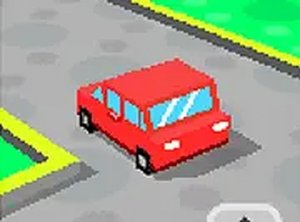
Pixel Park 3D combines retro pixel graphics with modern 3D gameplay for a unique parking experience. The levels start easy but quickly require careful steering and timing. The game is free, works on any device, and offers good replay value as you try to beat your own times. It is a solid choice for casual gamers who enjoy skill-based puzzles.
Description
Game Introduction
Pixel Park 3D is a browser-based parking game that combines a charming pixel art style with 3D environments. Players control a red car and navigate through various parking lots to reach designated parking spots. The core objective is to park accurately while avoiding obstacles that can damage the vehicle. As players progress, the challenges become more demanding, testing precision and timing. This game is designed for both casual gamers and parking enthusiasts, offering an accessible yet engaging experience. It runs directly in the browser on mobile and desktop devices, with no downloads required, and includes a full-screen mode for an immersive feel.
How to Play
Players typically start by selecting a level from the game menu. Using keyboard arrows or on-screen controls, they drive the red car through the parking lot. The goal is to park in a highlighted area without hitting any obstacles such as walls or traps. Each level may have a time limit, requiring careful planning of moves. As the game advances, parking spots become trickier to reach, demanding precise steering and braking. The controls are intuitive, making the game easy to pick up for players of all ages.
Game Features
Pixel Park 3D features pixel graphics combined with 3D environments. It includes multiple levels with increasing difficulty, supporting both mobile and desktop play. The game is free to play, offers full-screen mode, and requires no downloads. It is family-friendly and safe for all ages, focusing on driving precision and obstacle avoidance.
Tips for Success
Practice regularly to improve your steering and braking timing. Pay close attention to the parking spot markers and plan your route before moving. Avoid rushing, as many obstacles are placed to catch impatient drivers. Use the full-screen view to better judge distances and angles. If you fail a level, study the layout and try a different approach. Consistent practice will help you master the increasingly tricky parking challenges.
Compatibility
Faq
Is Pixel Park 3D free to play?
Do I need to download anything to play?
Can I play on my phone or tablet?
What happens if I hit an obstacle?
Is there a time limit in each level?
Are there different cars or just the red car?
Related Picks
Park The Taxi 2 Parking Puzzle
Clean controls and clever puzzles. Perfect for quick, focused play sessions.
SuperMoto GT Racing Game
Smooth 3D graphics and responsive controls. The multiplayer mode adds great replay value.
Drift Empire 3D Racing Game
Smooth controls and vibrant tracks make this a solid choice for drift fans. Great for quick sessions.
Turbo Cars: Pipe Stunts Driving
Fast neon stunt racing with fun car unlocks. Great for quick adrenaline bursts.
Hue Run Speed Racing Arcade
Clean design and smooth gameplay. Great for short breaks.
Desert Racer Arcade
Smooth driving and peaceful desert views. Perfect for relaxing breaks.
Drift Boss Arcade Racing Game
Simple controls, addictive gameplay, and colorful tracks. Great for quick fun.
Military Vehicle Transport Simulator
Realistic 3D driving with clear objectives. Good for practicing vehicle control.