Turbo Rush Racing Challenge
Reviews
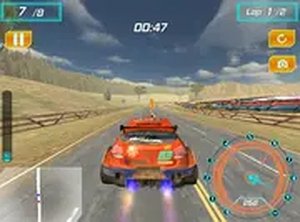
Turbo Rush Racing Challenge delivers exciting arcade racing with a focus on speed and strategy. The nitro boost mechanic adds a tactical layer, while car-to-car contact provides an extra challenge. Multiple cars and tracks keep each race fresh. It is free, browser-based, and family-friendly, making it a solid choice for casual racing fans.
Description
Game Introduction
Turbo Rush Racing Challenge is an arcade-style racing game that puts you behind the wheel of fast sports cars on a variety of challenging tracks. The main goal is to race at high speed, weave through traffic, and use nitro boosts to overtake rivals. Contact with other cars is a part of the strategy to gain an advantage. With multiple vehicles and track options, each race offers a fresh experience. This browser-based game requires no downloads and runs smoothly on desktop computers. Full-screen mode makes the experience more immersive, allowing you to focus on the road ahead. It is a family-friendly choice for anyone who enjoys competitive racing and action-packed gameplay.
How to Play
To play Turbo Rush Racing Challenge, use your keyboard. The arrow keys or WASD keys control steering and acceleration. Press the spacebar or a designated key to activate the nitro boost for a temporary speed increase. Navigate the track, avoid obstacles, and use contact with rival cars to slow them down or push them aside. Stay ahead of the pack and cross the finish line first to win. The game is designed for desktop play, so a keyboard and mouse are recommended. Practice your timing on nitro boosts and learn each track layout to master every race.
Game Features
Turbo Rush Racing Challenge offers fast-paced racing with nitro boosts and car-to-car contact. Multiple cars and tracks are available to choose from. The game is free to play in a browser with no downloads required. Full-screen mode provides an immersive experience. The content is family-friendly and suitable for all ages.
Tips for Success
Turbo Rush Racing Challenge rewards quick reflexes and smart use of boosts. The contact mechanic adds a layer of strategy without being overly complex. Practice regularly to learn each track layout and improve your timing on nitro boosts. Focus on maintaining speed through turns and using boosts at the right moments to gain an edge.
✅ Compatibility & Testing
Faq
Is Turbo Rush Racing Challenge available on mobile devices?
Can I play Turbo Rush Racing Challenge offline?
Does Turbo Rush Racing Challenge have a multiplayer mode?
How many cars are available in Turbo Rush Racing Challenge?
Are there any in-game purchases in Turbo Rush Racing Challenge?
What are the system requirements for Turbo Rush Racing Challenge?
Related Picks

Ninja Gaiden: Arcade Action Platformer
Ninja Gaiden delivers classic arcade action with tight controls and rewarding progression. A timeless platformer.
Cube Creatures: Retro Platform Journey
A charming retro platformer with cute cube creatures, star collection, and many costume options. Fun for all ages.
Mini Guardian: Arcade Survival
Precision aiming and quirky enemies make this endless arcade game a delightful challenge for quick sessions.

Creature Arcade Action
Fast-paced creature action with simple controls. Great for quick sessions and improving your high score.
Champion Clash 6 Retro Fighter
A faithful fan-made expansion with a large roster and classic arcade feel. Great for retro fighting fans.

Endless Ball Reflex Arcade
Endless Ball Reflex Arcade offers pure reflex fun with simple controls and endless challenge for all ages.

Escape Drive: Traffic Survival Arcade
A pure driving challenge that rewards skill and patience. No violence, just traffic weaving and drift mechanics.

Snowtrail Legends: Winter Sled Challenge
Fast-paced winter sled game with randomized courses and unlockable sleds. Great for reflex training.