German Language Quiz Puzzle
Reviews
German Language Quiz Puzzle is an excellent free tool for beginners. It offers three distinct quiz types—image association, sentence construction, and word pairs—that cover basic vocabulary and grammar. The instant feedback explains correct answers, which is very helpful for learning. It works smoothly on mobile and desktop browsers without any downloads. A great choice for casual practice.
Description
Game Introduction
German Language Quiz Puzzle is a free browser-based tool designed for beginners who want to build foundational German language skills. The game focuses on vocabulary and basic grammar through interactive mini quizzes, making it suitable for children and adults who are starting to learn German or wish to refresh their knowledge. Its approach combines word puzzles with educational content, offering a playful yet structured way to practice. Players can expect to encounter a variety of quiz types that test different aspects of the language, from recognizing common words to forming simple sentences. The game is accessible directly in a web browser without any downloads, and it works on mobile phones, tablets, and desktop computers. This makes it convenient for quick practice sessions at home, during commutes, or in a classroom setting. The content is designed to be engaging and rewarding, helping learners progress at their own pace while reinforcing correct answers through immediate feedback.
How to Play
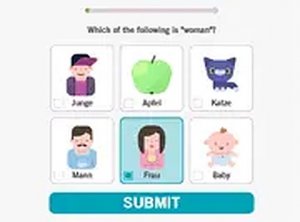
Players start by launching the game in their browser. The game presents a series of mini quizzes that test different aspects of German. In image word association quizzes, players look at a picture and select the correct German word from given options. Sentence construction quizzes require players to arrange words in the correct order to form a proper German sentence. Word pair quizzes ask players to match related terms. After each answer, the game provides instant feedback, showing whether the answer is correct and explaining the right answer if needed. Players can use a mouse on computers or their finger on touchscreens to interact. The quizzes are self-contained, so players can repeat them as often as they like to reinforce learning.
Game Features
The game is free to play and requires no downloads, working directly in a web browser. It is compatible with mobile phones, tablets, and desktop computers, and is touchscreen friendly for easy use on mobile devices. The game includes three types of quizzes: image word association, sentence construction, and word pairs. It provides instant feedback for each answer, helping players learn from mistakes. A full screen mode is available for an immersive, focused practice experience. The interface is simple and intuitive, making it easy for young learners and adults alike to navigate without confusion.
Tips for Success
To get the most out of this game, practice regularly to reinforce vocabulary and grammar. Focus on one quiz type at a time to build confidence before moving to others. Pay close attention to the instant feedback, as it explains correct answers and helps you understand mistakes. Use the full screen mode to minimize distractions. Try to repeat quizzes you found difficult to improve your skills.