Wizard Flight Arcade Game
Reviews
Wizard Flight offers a delightful flying experience with its magical theme and easy-to-learn controls. The one-tap mechanic is intuitive, making it accessible for all ages. The bright visuals and gradual difficulty increase keep the gameplay engaging without being stressful. It is an ideal choice for casual gamers looking for a lighthearted challenge.
Description
Game Introduction
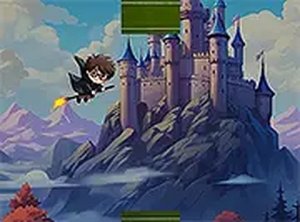
Wizard Flight is a hypercasual arcade game where you control a young wizard flying through a magical world. The core objective is to soar as far as possible while avoiding obstacles. Its simple one-touch controls and bright, enchanting visuals make it a lighthearted escape for players of all ages. The game focuses on timing and reflexes, offering a relaxing yet engaging challenge that can be enjoyed in short sessions or longer breaks.
How to Play
Playing Wizard Flight is straightforward. Players typically use a keyboard or mouse to control the wizard’s height: tapping or clicking makes him rise, and releasing lets him fall. The key is to time these actions carefully to dodge obstacles that appear in various shapes and speeds. The game ends if you hit an obstacle, so staying focused and moving forward is essential. The intuitive controls let you concentrate on your reflexes and coordination.
Game Features
The game features simple one-touch controls that are easy to learn. Its magical fantasy theme creates an immersive atmosphere. It is free to play directly in your browser with no downloads required. Full-screen mode enhances the visual experience. The content is family-friendly and suitable for all ages, making it a great choice for casual gaming sessions.
Tips for Success
To succeed in Wizard Flight, practice timing your taps to navigate obstacles smoothly. Stay calm and focused, as panicking can lead to mistakes. Learn the patterns of obstacles to anticipate their movements. Regular practice will improve your reflexes and help you fly farther. Remember that short, controlled taps are often more effective than holding the button down.