Point Builder Brick Press
Reviews
Point Builder Brick Press strips away all unnecessary complexity to offer a pure incremental experience. The single brick interface is visually calming, and the immediate score feedback is satisfying. There are no distractions, no timers, and no penalties. This makes it an excellent choice for winding down or filling short gaps in the day. The lack of features might feel limiting to some, but for those seeking a simple, focused activity, it works perfectly.
Description
Core Pressing Loop
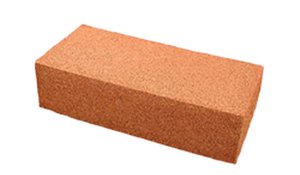
The entire game revolves around a single action: pressing the brick shown on screen. Each press adds a point to your total. There are no combos, multipliers, or special moves to learn. This direct feedback loop makes it easy to pick up and put down at any moment. The score counter updates instantly, providing a clear sense of progress with each press.
Visual Simplicity
The interface is kept deliberately clean. A single brick occupies the center of the screen, surrounded by a minimal score display. Colors are soft and non-distracting. This design choice helps players focus on the pressing rhythm without visual clutter. The brick may respond with a subtle animation or color change on each press, offering gentle feedback.
Session Flexibility
There are no timers, levels, or penalties for stopping. Players can press for thirty seconds or thirty minutes, depending on their schedule. The game does not save progress between sessions, so each play starts fresh. This makes it ideal for moments when you want a brief, low-commitment activity. The lack of pressure encourages a calm, meditative play style.
Accessibility Considerations
The game requires only a mouse or trackpad. No keyboard shortcuts are needed, though zoom controls are available for those who prefer a larger view. The font and button sizes are large enough for easy reading. Because there is no text-heavy content or complex menus, players of all ages and language backgrounds can start playing immediately.
Math-Free Enjoyment
Despite the 'Math' tag, the game does not require any arithmetic. The score simply increases by one with each press. There are no equations, puzzles, or number patterns to solve. The math tag likely refers to the incremental scoring system, which naturally involves counting. Players who enjoy watching numbers grow will find this satisfying without needing any mathematical skill.